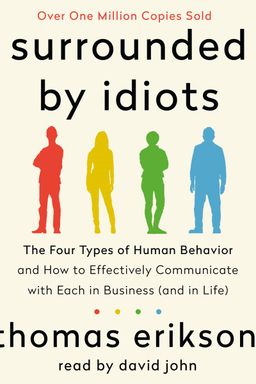
Surrounded by Idiots cover

Surrounded by Idiots

by Thomas Erikson

Surrounded by Idiots offers a deep dive into four distinct personality types and provides actionable strategies for communicating effectively with each. By understanding these personality dynamics, you can improve your interactions, reduce conflicts, and create a more harmonious environment in both your personal and professional life.

Mastering Your Digital Library with Calibre

Have you ever felt overwhelmed trying to manage hundreds of ebooks scattered across devices, folders, and formats? Guida rapida di Calibre by John Schember transforms that frustration into clarity. The book introduces you to Calibre—an open-source, all-in-one ebook management platform designed to organize, convert, and synchronize your digital reading life. Schember argues that every reader, regardless of technical skill, can regain control of their ebook collection with a few essential tools and workflows.

At its core, the guide emphasizes that Calibre isn’t just a simple ebook viewer; it’s a personal librarian, conversion engine, metadata workshop, and publisher all in one. Schember highlights that the real power of Calibre lies in understanding its flexible modules: organization, conversion, editing, news downloads, device interaction, and reading. Each function builds upon the next to give you total autonomy over your digital library—something that proprietary ecosystems like Amazon’s Kindle rarely allow.

A World of Fragmented Formats

Schember places readers in the “Tower of eBabel,” his metaphor for the fragmented world of ebook formats. Kindle, Kobo, Nook, and others each speak their own digital language, often sheltered behind DRM (Digital Rights Management). The result? Confusion—and frustration. Calibre stands as the translator in this chaos. Its ability to convert files between dozens of formats means you can read your books wherever you want, without being trapped by vendor limitations (a theme reminiscent of Cory Doctorow’s critiques of closed ecosystems).

With deliberate explanations, Schember demystifies terms like AZW3, EPUB, and MOBI, showing that these are not mere technical details but the keys to genuine reading freedom. DRM restrictions, though, remain his chief villain: a feature he boldly calls “Digital Restrictions Management” to underscore their limiting nature. He makes it clear that while Calibre empowers readers, legality and licensing should always be considered before converting DRM-protected files.

Empowering the Everyday Reader

Schember writes not for IT professionals, but for everyday readers—people who simply want their collections to make sense. Once you install Calibre, a guided wizard walks you through creating your first library, setting the location of your ebook files, and optimizing the setup for your device. This moment marks a shift in the reader’s mindset: you no longer think in “files and folders,” but in “books and metadata.” Every ebook becomes part of a curated collection with searchable author fields, series metadata, and even automatically downloaded covers.

For Schember, metadata isn’t just about accuracy—it’s about aesthetics and control. When you click “Download Metadata,” Calibre gathers complete information from online databases, aligning your ebooks with their real-world counterparts. That single act of refinement transforms a chaotic library into something personal and professional.

Calibre’s Guiding Philosophy

The book’s deeper message extends beyond technology: control over one’s digital property. While corporations push readers toward proprietary systems, Calibre reminds them of open-source values—freedom, flexibility, and community. Schember repeatedly emphasizes that Calibre thrives on collective development, with thousands of contributors refining it for users worldwide. Its evolution mirrors the broader fight for digital ownership (similar to open-source champions like Linus Torvalds or Richard Stallman).

By the end of the introduction, readers understand that using Calibre is not merely learning software—it’s adopting a philosophy. The guide’s structure mirrors that belief: each chapter explores one dimension of autonomy, from how to organize books efficiently to converting and editing them for maximum compatibility. The closing chapters even guide you toward self-sufficiency, showing where to find help—from built-in preferences to active online communities.

In essence, Guida rapida di Calibre is more than a manual—it’s a manifesto for digital readers. It teaches you how to own your library again, understand your files, and shape your reading experience on your own terms.

Across the chapters, you'll learn how to manage your collection, perform conversions between formats, modify ebooks visually and structurally, download daily news into readable form, synchronize every device you own, and finally—read seamlessly within Calibre’s elegant built-in viewer. Each function reinforces one idea: the technology should adapt to you, not the other way around.


Building and Organizing Your Library

Once you’ve installed Calibre, the first major function you’ll master is organization. This isn't just filing books—it’s creating a searchable, dynamic database of your entire digital collection. Schember walks you through the process step by step, showing how the “Add Books” button is the gateway to total order. Each book imported becomes part of Calibre’s internal structure; from that point forward, you can forget about the original file and focus entirely on how you want your library to look and behave.

Metadata and Covers: The Heart of Organization

Calibre reads every ebook’s metadata, but these tags are often incomplete or wrong. Schember encourages you to take ownership of this data. With the “Edit Metadata” feature, you can fill in details manually or let Calibre automatically fetch them from the web. The transformation is startling: plain filenames become beautifully detailed entries, complete with author bios, ratings, and crisp digital covers. Pressing “Download Cover” enhances aesthetics further, making your virtual shelf visually appealing—more like a bookshop for your mind.

Power users can also tag books by topic, series, or custom categories. This structure pays off when your collection grows into the hundreds or thousands. The left-hand tag browser becomes an intuitive control panel, allowing you to reveal or hide subsets of your library instantly. Every click refines your view, without ever deleting data. It’s fast, flexible, and deeply satisfying for completionists and researchers alike.

Smarter Search, Simpler Control

Schember explains that Calibre’s search bar sits above the book list for a reason—it’s the real engine of organization. Whether you type in an author’s name, a title, or a piece of metadata, Calibre instantly filters results. If you’re feeling advanced, you can enter search commands directly: a skill that turns Calibre into a custom-built research tool. Combined with the tag browser, searching becomes effortless refinement rather than chaos.

In Schember’s view, good organization isn’t sterile record-keeping—it’s empowerment. It gives you the clarity to find the right story at the right moment, whether that’s a technical manual, a novel, or a public-domain classic.

By redefining organization as metadata mastery, Schember elevates what might seem like an administrative task into an act of creative curation—turning your collection into a personalized digital library worthy of pride.


Mastering Ebook Conversion

No part of Calibre’s toolkit embodies its philosophy more than ebook conversion. With dozens of incompatible formats in circulation—AZW3, EPUB, MOBI, PDF, and more—Schember identifies conversion as both the most useful and technically intricate part of Calibre’s ecosystem.

Understanding the Format Wars

Schember compares the confusion of ebook formats to the VHS versus Betamax battle. Kindle uses AZW3, Kobo and Nook use EPUB, and none of them play nicely together. Calibre acts like a universal translator. For example, if you’ve downloaded an EPUB but want to read it on your Kindle, Calibre can convert it to AZW3 automatically, preserving formatting where possible.

He explains why formats proliferate—technological progress, proprietary control, and evolving multimedia capabilities like audio and video in EPUB 3. Understanding these nuances, you realize conversion isn’t merely technical; it’s philosophical—a decision about how you’ll engage with your reading material.

Automatic vs. Manual Conversion

For everyday users, Calibre’s automatic conversion is nearly magic. Just select a book, connect your device, and press “Send to Device.” Calibre checks whether your reader supports the file. If not, it prompts you to convert automatically—and does so in seconds.

Power users, however, can dive deeper with manual conversion. In the “Convert Books” interface, you’ll find tools for detailed customization—format outputs, page setup, paragraph spacing, and embedding fonts. Schember highlights the “Remove space between paragraphs” option as particularly useful for recreating the look of printed books.

DRM: The Conversion Wall

Yet, there’s one boundary Calibre won’t cross: DRM. Schember devotes an entire section to this issue, calling DRM the “ruin of conversion.” Since removing DRM involves breaking digital locks—a legally grey area in many countries—Calibre avoids those operations. The message is clear: readers should push for reform, not resort to piracy. That ethical stance preserves Calibre as a community-focused, law-abiding open tool.

Conversion is Calibre’s act of liberation—it frees your books from the tyranny of formats, letting you read what you want, where you want, and how you prefer.

Through this lens, Schember turns what could have been a dry technical tutorial into a declaration of digital independence.


Editing Like a Digital Publisher

Many readers accept ebooks as immutable files—but Calibre offers the freedom of a publisher. In the chapter on editing ebooks, Schember reveals the built-in editor supporting formats like EPUB and AZW3. With a right-click and “Edit Book,” you’re no longer just a reader—you become an artisan.

Precision Tools for Perfection

The editing environment supports syntax highlighting, live previews, and error checks. Tiny details like font embedding, punctuation refinement, and removing unused CSS elements transform amateur ebooks into professional-quality publications. You can correct typos, rearrange formatting, or even rebuild the table of contents.

Schember emphasizes that these tools aren’t just for programmers; their clean interface and live feedback make powerful editing accessible to anyone who can use a word processor. He notes that authors use Calibre’s editor to finalize self-published works before distribution—bridging the gap between casual reading and professional publishing (a point echoed by self-publishing guides like Mark Coker’s Smashwords Book Marketing Guide).

Calibre’s editor empowers you to treat every ebook as a living document—editable, improvable, and truly yours.

By combining user-friendly design with professional-grade capabilities, Schember ensures that even the most meticulous readers can craft ebooks that meet their exact standards.


Downloading and Reading the News

One of Calibre’s most underrated features, according to Schember, is its news download system. Imagine waking up each morning to your favorite newspapers and magazines reformatted for your Kindle or Kobo—clean, ad-free, and readable. That’s exactly what Calibre’s “Recipes” feature does.

From the Web to Your E-Reader

The software includes over 1,500 built-in sources covering multiple languages and topics. Each news feed, or “recipe,” automatically fetches content, processes it, and formats it as an ebook using your chosen output style. You can then read these digital newspapers directly in Calibre or send them automatically to your device.

Schember recommends setting automatic schedules for your favorite publications so your device becomes a personalized daily digest. For instance, a reader in Italy could subscribe to La Repubblica and Corriere della Sera, both retrieved and converted at dawn, ready to read over coffee—without opening a browser.

Control Over Automation

Automation is elegant but optional; manual downloads can be triggered anytime. Preferences let you choose whether Calibre sends these files automatically or waits for manual transfer. You can even tell Calibre to delete downloaded issues after they’ve been sent, keeping your library tidy.

Through its news feature, Calibre becomes more than a library—it turns into an information hub, adapting the rich flow of daily content to the calm, focused rhythm of reading.

It’s one of the clearest examples of Schember’s theme: blending functionality and freedom so you—not algorithms—decide what to read and how to experience it.


Syncing Seamlessly with Devices

In the section on interacting with devices, Schember connects theory with practice. Reading is a multi-device activity—Kindles, Kobos, smartphones—and Calibre manages them all. Once your device is plugged in, a new “Device” icon appears beside “Library,” allowing seamless switching between stored books and device contents.

The Simplicity of Sending Books

Transferring books couldn’t be simpler: select a title, click “Send to Device,” and Calibre knows what to do. It checks format compatibility, converts automatically if needed, and even tracks what’s already on the device. Removing books or ejecting safely is equally straightforward—Calibre behaves like a disciplined librarian.

Advanced Device Configuration

For tinkerers, Schember introduces customization features. You can define folder structures using dynamic naming templates (like “favorites/{title} – {authors}”). You can reorder or disable ebook formats so that your device defaults to your preferred ones. This flexibility is particularly powerful for niche readers using devices beyond the mainstream.

Calibre bridges the gap between your devices, ensuring your reading world stays synchronized without sacrificing control or simplicity.

In a digital landscape where vendor lock-in reigns, Schember’s tutorial on multi-device syncing feels almost radical—reminding you that the joy of reading should move freely across platforms.


Where to Find Help and Keep Learning

Schember closes the guide with a thoughtful roadmap for continuous learning. Even though Calibre is intuitive, its flexibility means there’s always more to explore. The software’s built-in preferences menu includes tooltips and contextual guides for almost every setting. Whenever you think, “Can Calibre do that?”, the answer is probably yes—and it’s explained somewhere in Preferences.

Community and Collaboration

The manual user guide and active forums on MobileRead serve as Calibre’s living knowledge base. Users, including Schember himself and the creator Kovid Goyal, regularly answer questions. If you discover bugs or have feature requests, the bug tracker ensures ideas don’t disappear. Schember notes that reporting on the tracker instead of posting in forums guarantees follow-up—a subtle lesson in effective open-source collaboration.

In Calibre’s world, you’re not just a user—you’re a participant. The tool improves because its readers care enough to shape it.

By closing on community, not technology, Schember completes his vision: a reading ecosystem where ownership, knowledge, and empowerment flow both ways, from developers to readers and back again.

Dig Deeper

Get personalized prompts to apply these lessons to your life and deepen your understanding.

Go Deeper

Get the Full Experience

Download Insight Books for AI-powered reflections, quizzes, and more.